


Design Home™: House Makeover
4.3203.55K Reviews
App Specs
- Version
- 1.135.066
- Updated On
- License
- Free
- Downloads
- 50,000,000+
- Developer
- Crowdstar Inc
- Categories
- Simulation
- Platform
- Android, iOS
Screenshots


 Analysis by AppCompare
I tend to enjoy design games most when they make me think about why a room works, not just which expensive-looking sofa to tap. Design Home™: House Makeover has that appealing, low-pressure fantasy: take a room that needs attention, make choices, and see a complete interior come together. Its appeal is less about mastering a complicated simulation and more about trying out looks I might never commit to in my own home.
That makes it a pleasant fit for short creative breaks. I can browse a room, picture a direction, and make a handful of decisions without needing to plan an entire house renovation. The trade-off is that the game’s structure guides the experience: it gives me a brief to work within rather than a completely open space where I can build anything from scratch. If that sounds like a helpful nudge instead of a restriction, its central loop is easy to settle into.
A quick way to try a design idea
A realistic use for the game is an idle moment when I’m waiting for an appointment or winding down after dinner. I can treat a challenge as a tiny mood board exercise: choose one anchor piece, then make the other selections feel as though they belong with it. That simple approach is more satisfying than tapping through options at random, and it helps me see how color, furniture, and decorative choices affect the whole room.
I’d also use it when I’m unsure about a broad style direction, not as a precise plan for buying furniture. A virtual room can help me compare the feeling of a softer, more traditional arrangement with a cleaner modern one. But the finished image is inspiration, not a reliable preview of how a real room will look: the game’s presentation and available choices shape the result, while actual rooms have different light, dimensions, budgets, and practical needs.
Who will enjoy the guided format
This is especially suited to people who like visual puzzles, interiors, and making a space feel coherent without needing a technical design tool. The themed challenges offer a useful starting point for anyone who freezes in front of a blank canvas. They’re also a good excuse to experiment with combinations that might feel too bold at home, where replacing a real sofa is a much bigger commitment than trying one in a game.
On the other hand, I wouldn’t pick it as my main option if I wanted detailed floor plans, exact measurements, renovation advice, or complete control over every part of a house. A dedicated room-planning tool is a better choice for checking whether furniture will fit or mapping out a real project. And if I wanted a simulation focused on managing a home or building a long story, this design-centered format would feel narrow; its pleasure is in decorating the brief in front of me.
Making choices without chasing every item
One useful habit is to settle on a palette before browsing deeply. I’ll decide whether the room should feel warm, cool, restrained, or playful, then use that as a filter when considering individual pieces. This keeps a design from becoming a collection of attractive objects that compete for attention. I also try to think about the room’s main focal point first; once that choice is clear, the supporting pieces are easier to judge.
Worth Reading Before You Choose

EA SPORTS FC Mobile 26 Is a Bigger Football Game, but It Takes Time

Flipboard Shows What News Apps Must Do Beyond the Feed

Switching to Android Auto Means Rethinking Your Driving Routine

Google Calendar Makes a Crowded Week Easier to Manage

Ludo King Makes the Most of the Minutes Between Plans

Baby Panda World Brings Quick Play to Modern Phones, but Its Game Library Feels Busy
There’s a practical trade-off between creative freedom and the game’s reward structure. Challenges give me a reason to finish designs and provide a sense of progress, but earning new options can make the experience feel more like a series of guided assignments than a totally unrestricted studio. I’d focus on making each room feel intentional rather than treating every available item as something I need to use. That mindset helps keep the activity enjoyable even when I’m not pursuing every reward or purchase.
What to expect from the cost and connection
The game is free to start, and its in-app purchases range from $0.99 to $199.99 per item, so I’d go in with a personal spending limit if optional purchases tend to tempt me. I can enjoy the design activity without assuming that every premium-looking choice is necessary. For a casual player, taking time with the available options is a sensible way to decide whether the game’s rhythm is worth spending on at all.
I’d also save it for a time and place with a dependable internet connection. That matters if I’m hoping to use it as an offline distraction while traveling: the original review notes that connectivity can be a hassle away from Wi-Fi, so I wouldn’t count on every session working smoothly without access. It’s a small planning point, but an important one for a game whose appeal depends on browsing and completing designs rather than simply opening a self-contained puzzle.
Getting Started: A Designer's Playground
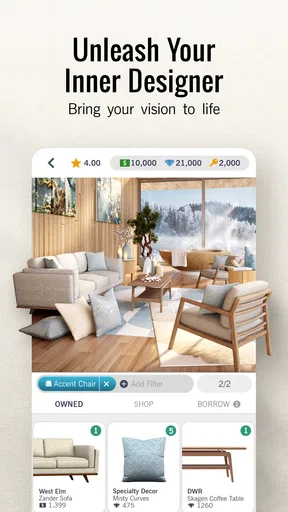
From the moment you launch Design Home™, you're thrown into a world of endless design possibilities. The app is visually stunning, with a user interface that’s as sleek as a modern minimalist kitchen. It’s intuitive, making it super easy to dive right in and start designing your dream spaces. The app essentially gives you a blank canvas—rooms that need your creative touch and flair.
As a simulation game from Crowdstar Inc, it focuses on interior decisions rather than complex building controls. It’s free to download, has a 4.3 average from around 1.2 million ratings, and has passed 50 million installs. Its Everyone age rating makes the premise approachable for a broad audience, though the purchase options are worth remembering if a child is playing. The current version is 1.128.079, and it requires Android 7.0 or later.
One of the first things you'll notice is the wide range of furniture and decor options available. Whether you’re into contemporary styles or something more classic, there’s something here for every taste. Plus, these items are from real-world brands, which adds a layer of authenticity and makes the experience feel all the more real.
The Joy of Customization
Customization is where Design Home™ shines. You get to select everything from the color of the walls to the style of the furniture. Wanna throw in a plush velvet sofa or a chic glass coffee table? Go for it! The app encourages creativity and lets you mix and match styles to your heart's content. It’s like being a real interior designer, minus the hefty price tags and client demands.
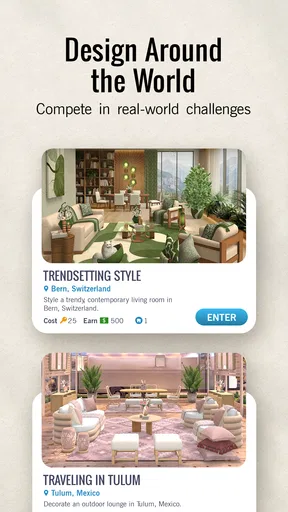
The gameplay revolves around designing rooms to complete daily challenges. Each challenge sets a specific theme or requirement, such as designing a cozy living room or an elegant dining area. Completing these challenges not only lets you flex your creative muscles but also earns you rewards that can be used to unlock more design options.
That brief-driven setup is the key difference from a freeform decorating sandbox. I find the prompt useful when I want a clear starting point, but it can narrow the choices to what suits the challenge rather than what I’d choose for an imaginary home of my own. If I’m in the mood to explore without a target, the assignment-like rhythm may feel less relaxing. If I want a small design problem to solve, it gives the session shape.
Community Engagement: Share and Inspire
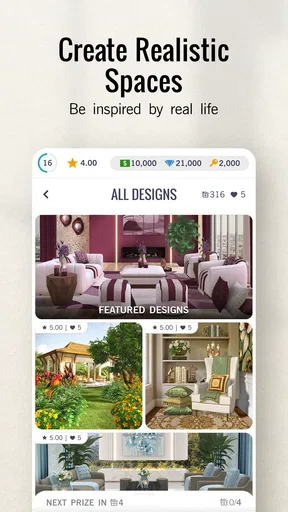
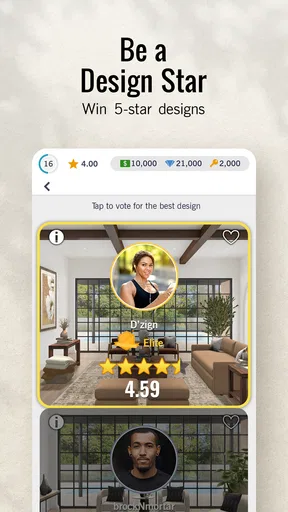
One of the features I absolutely love is the community aspect. You can share your designs with other users and even get feedback. It's a fantastic way to get inspired and see how others are tackling the same challenges. Plus, there’s a voting system where you can rate others' designs and get yours rated, adding a fun, competitive edge to the app.
I’d use that community as a source of ideas, rather than treating votes as a definitive test of design skill. Looking at different responses to a shared brief can show how one room can support several moods, and it may give me a color or furniture combination I hadn’t considered. At the same time, a voting element can shift attention toward what seems popular. When I care more about practicing my own taste, I try to make the room coherent on its own terms before worrying about how others might judge it.
It’s not just about designing; it’s about being part of a community of like-minded individuals who share a passion for interior design. It’s like having a mini design network right in your pocket.
Real-World Rewards
Now, here’s where things get interesting. The app actually partners with real furniture brands, so if you fall in love with a piece you’ve used in your design, you can purchase it for your own home. It’s a seamless integration of virtual and real-world elements, making the experience all the more engaging.
Not only does this offer a chance to bring your virtual designs to life, but it also provides exposure to a plethora of brands you might not have discovered otherwise. It’s a win-win!
I’d still treat a virtual pick as a starting point for browsing, not an automatic shopping recommendation. A piece can look perfect in a styled game room and be wrong for my budget, space, or everyday use. The useful part is noticing what attracts me: perhaps a particular finish, silhouette, or contrast. From there, I can look for something that suits my actual home instead of assuming the pictured arrangement will transfer unchanged.
A Few Quirks
While Design Home™ is a delight to use, it’s not without its quirks. For one, some of the premium items require in-app purchases, which might not be everyone’s cup of tea. However, you can still enjoy a rich design experience with the free items available. Also, the reliance on internet connectivity can be a bit of a hassle if you’re on the go without Wi-Fi.
The broader limitation is that this is a styling game, not a substitute for interior-design software or professional advice. It can help me explore visual preferences, but it doesn’t turn a design into a practical renovation plan. I’d choose a measurement-based planner when dimensions matter, and I’d skip this game if I wanted a deep management simulation, a narrative campaign, or a tool that works reliably as an offline pastime. Knowing that distinction makes it easier to enjoy what it does offer without asking it to solve a different problem.
Overall, these minor hiccups don’t overshadow the creative freedom and joy the app provides. It’s perfect for anyone looking to unleash their inner designer without the need for formal training.
If you’ve ever dreamed of designing stunning interiors, Design Home™: House Makeover is your playground. With its vast array of customization options, community features, and real-world integration, it’s more than just a game—it’s a gateway to creativity and inspiration. So, what are you waiting for? Dive in and start designing your perfect space today!
Where its atmosphere lands
For me, the lasting appeal is the calm visual ritual of turning a brief into a finished room. Its setting keeps the focus on interiors, and the pacing gives each design a clear beginning and end rather than asking me to maintain a sprawling project. I wouldn’t describe it as a substitute for hands-on decorating, but as a pocket-sized way to play with taste and notice what styles I keep returning to.
That mood is strongest when I approach it as inspiration and a creative break, not as a contest I need to win or a shopping list I need to follow. If I want structured decorating choices, recognizable room themes, and a community to browse, I can see myself returning. If I need precise planning, uninterrupted offline play, or total freedom from prompts and optional purchases, I’d choose another kind of tool. For the right player, though, it makes interior design feel inviting without pretending that virtual rooms are real-life plans.
Pros
- Intuitive and user-friendly interface.
- Wide variety of design options.
- Regular updates with new items.
- Engaging community challenges.
- Realistic 3D graphics enhance experience.
Cons
- In-app purchases can be expensive.
- Limited free items available initially.
- Requires constant internet connection.
- Can be time-consuming to progress.
- Occasional app crashes reported.
FAQs for Design Home™: House Makeover
What is Design Home™: House Makeover about?
Design Home™: House Makeover is a simulation game where players can unleash their creativity by designing and decorating virtual homes. With a vast array of furniture and decor options, users can participate in daily challenges and showcase their interior design skills. It's perfect for those who enjoy home decor and design projects.
Is Design Home™: House Makeover free to play?
Yes, Design Home™ is free to download and play. However, it offers in-app purchases for additional items and currency, which can enhance the gaming experience. While players can progress without spending money, purchasing virtual currency can help unlock premium features and exclusive decor items.
Can I play Design Home™ offline?
Design Home™ requires an internet connection to play. The game frequently updates with new challenges, furniture, and decor items, which need to be downloaded. Additionally, connecting online allows players to interact with the community, vote on designs, and share their creations.
Are there any age restrictions for Design Home™?
Design Home™ is rated for players aged 4 and up. However, parental guidance is recommended, especially since the game includes in-app purchases. Parents should ensure that their children understand how to manage in-game spending and set appropriate restrictions through device settings.
How does the voting system work in Design Home™?
In Design Home™, players can submit their designs to be voted on by the community. The voting system involves comparing two designs side by side, and players choose the one they prefer. This system helps determine the top designs, rewarding players with in-game currency and prizes.


